Client Hub Kit

Give your coaching clients a personalized Client Hub that keeps everything in one place, call notes, resources, and helpful links, everything beautifully organized and tailored to your brand.
Whether You…
-
Want to deliver an amazing, streamlined client experience
-
Need one easy place for clients to access notes, links, and resources, without all the back-and-forth emails
-
Would love a simple way to plan client goals and track their progress over time
The Client Hub Kit is made for you.
It gives you everything you need to build a beautifully branded portal where you can organize, share, and manage all the essentials your coaching clients need, effortlessly👌.
How Do Client Hubs Work?
Think of a Client Hub as your client’s personalized online home base, a central space where everything they need throughout your coaching relationship is organized and easy to access.
Here’s how you can use your Client Hub:
-
Define your client’s main goals and track progress along the way
-
Share important links, like scheduling pages, intake forms, or onboarding materials
-
Keep all coaching call notes in one place, accessible to both of you
-
Provide personalized resources tailored to your client’s needs
-
Track action steps and assignments to keep momentum going
-
Create a space to celebrate wins and milestones together
-
Offer special bonuses like exclusive discounts or free content access
A well-designed Client Hub not only keeps everything organized, and it elevates the client experience by giving them one trusted place to return to throughout their journey with you.
The Client Hub also serves as a GREAT resource if you’re hosting bundles!
- Keep track of images
- Structure essential contributor info
- Have relevant links available for easy access
- Share the hub with all contributors
- Keep track of what links are working, and which are not.
- Keep an eye on those who’ve contributed products to any upsell packages
- Have an overview of bonuses
- Create detailed information for contributors on how well the bundle did(or didn’t)
Here’s what’s included
Here’s everything that you receive to craft attractive Hubs for your coaching clients.

Client hub template (Notion)
The first thing you get is your customisable Client Hub (Notion) Template.
With this template you can :
- Establish a central ‘hub’ to exchange call notes, resources, and helpful links with your clients.
- Distribute any onboarding or feedback forms you may have.
- Monitor progress throughout your client’s collaboration with you.
- Record agreed-upon goals, homework, or action items.
- Provide any bonuses you’d like to present to your client.
And the best part? You can FULLY CUSTOMISE the template – see below – so that it matches your own businesses branding perfectly 🎨✌️
Canva Templates
To make creating your Client Hubs SUPER EASY you also get a set of Canva templates that you can quickly add your own branding and styling to – meaning you can change the colours, fonts and / or add graphics so that your Client Hub perfectly matches your own business branding.
Note : You can use either a FREE or PAID Canva plan to do this! 🙌🙌🙌
Step By Step Tutorials
Lastly you get a set of video tutorials in your own course area which guide you through each step of creating your own Client Hubs.
These include :
- A template walkthrough showing you how to use your Client Hub
- How to choose what to include for your clients
- How to customise the branding and styling of your Client Hub
- How to create a welcome video for your clients
- How to share your Client Hub with new coaching clients
Some Examples
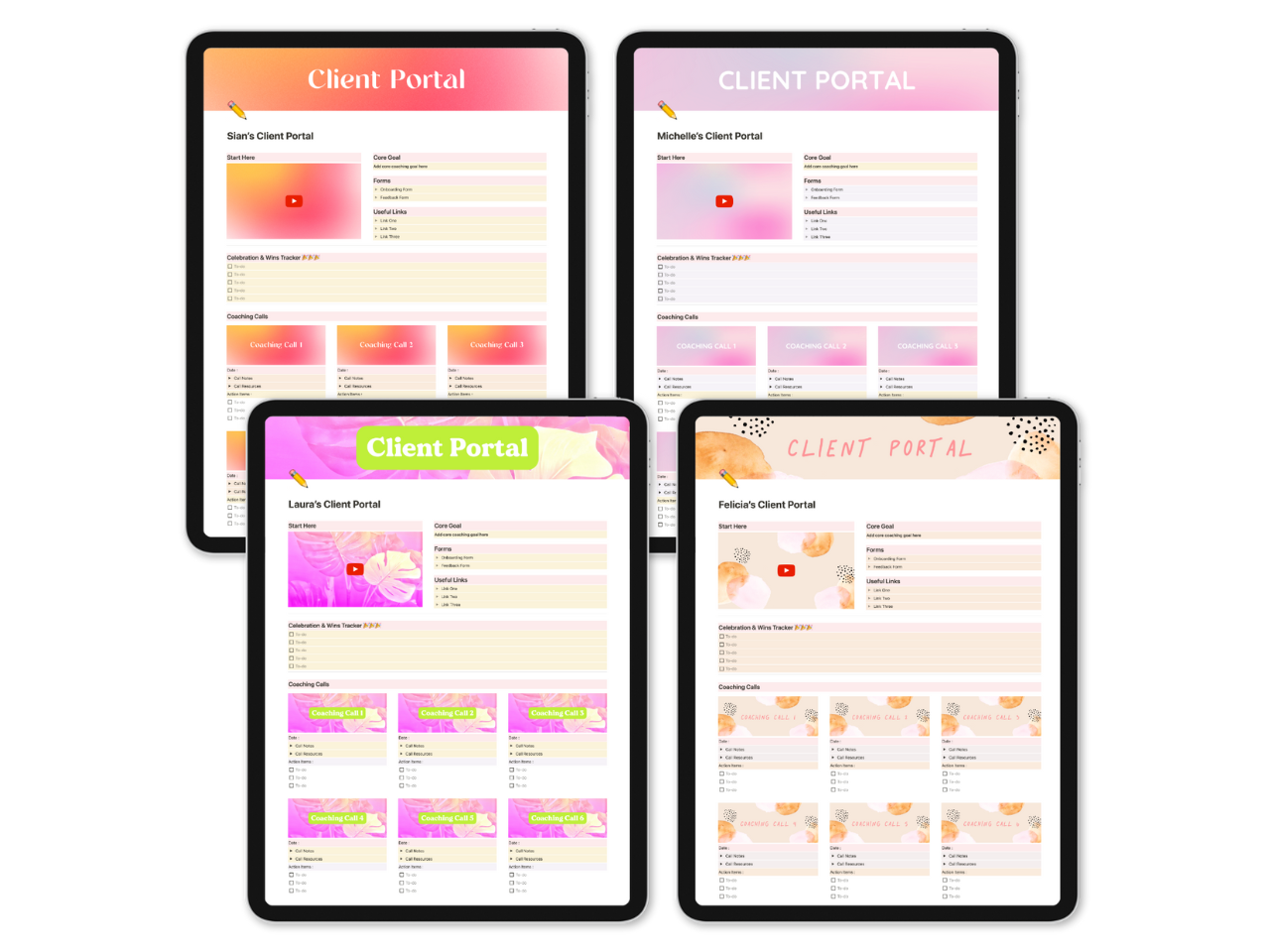
When you grab the Client Hub Kit, the Notion template it comes with is really basic. This way, you can easily add your own style and brand to make it uniquely yours. Here are a few simple examples:

How it works
1 : Purchase the Client Hub Kit via the ‘Buy Now’ button below(or at the top).
2 : Log in to the toolkit area and get instant access to the Client Hub Kit.
3 : Download the Notion and Canva templates inside, then follow the simple step by step video tutorials to create your own custom branded Client Hub.
4 : Start sharing your Client Hub with your clients!
Important Note : The Client Hub Kit uses a Notion template so you will need to use Notion to use this toolkit.
License Agreement
When you get the Client Hub Kit, you can make as many Client Hubs as you need for your clients, no limits. Just remember, you can’t sell or share the templates or content beyond what’s agreed upon with your coaching clients.
Frequently Asked Questions
License Agreement
Refund Policy
There are no refunds on this product so please make sure to read the sales page in full and ask any questions before you have before you purchase.
Do I need to use Notion to create my Client Hub?
Yes – the Client Hub template provided is a Notion template so you’ll need Notion to use it.
Do I need to use Canva Pro to use the design templates?
Nope – while you get more flexibility and design options when you use Canva Pro you can totally use Canva’s free account for this.
Got another question?
Simply drop me a message via my contact page and I’ll get back to you ASAP 🙂✌️
(c) Kreativ Aslaksen 2025 * Disclaimer * Privacy Policy * Cookies *ADA & WCAG * This page was created using Divi * All Rights Reserved